|
e-Board
Need to keep better track of your staff whereabouts? Tired of transferring calls, only to find the
staff member is not at their desk? If this sounds like you - e-Board is your solution.
What is e-Board?
e-Board is a simple to use Electronic Bulletin Board. It allows you to quickly look up where
a staff member is and whether they are available, all without leaving your desk!
What does e-Board look like?
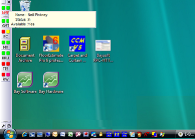
e-Board is a software program that sits on the side, top or bottom of your computer screen.
When you change your status, it shows all other users, in real-time, that your status or availability has changed.
How does e-Board work?
There are two traffic lights. The AVAILABILITY light shows whether a person is available or not
(Green=Available, Red=Not Available). The STATUS Light shows a colour coded status of a person
(e.g. At Lunch, On the Phone, Gone Home etc.)
When you hover over a persons initials with your
mouse, e-Board shows the person’s full name, a description of their status and any message left by that person.
|
 |
What can be customised?
Virtually anything. For example you decide:-
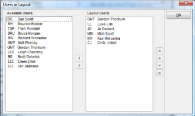
- Which staff members form part of which e-Board group. Simply create your groups and add the people into that group
Then decide which group you want to display on the screen. You can quickly and easily open & close different groups at any time
- The list order and display of staff on your e-Board. These are ordered by moving them up or down in the list, so you
can see the important people at the top of the list
- The positioning of e-Board on your screen
|
 |
Can I control what the user sees?
Of course. For example you decide:-
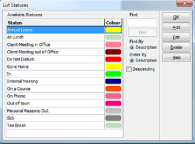
- The e-Board status names and colours. Simply think of a status you wish to track, enter it in the list and assign
it the colour of your choice
- Which users have administrative rights to maintain the database. An administrative user can edit and add groups,
users and statuses
|
 |
Click here to download the promotional leaflet for e-Board.
|
 Copyright Bay Software Solutions Ltd 2009
Last Modified:30/10/2013
|